스프링(Spring Framework)
추운겨울이 가고 따뜻한 봄이 오듯이, 소프트웨어 시장의 개발방식이 차가운 겨울에서 봄으로 옮겨진다는 의미로 만들어진 이름임!! 원래 기업에서 사용하는 웹 개발용 프레임워크 비용이 매우 높아서 함부로 접근하기 어려웠지만 이 스프링 도구로 인해서 개발이 쉬워짐
=> 빅데이터 분석에서도 사용도구는 매우 비용이 높았지만 현재는 파이썬이라는 무료 소프트웨어와 오픈소스로 인한 막대한 라이브러리로 인해서 무비용으로 빅데이터 분석이 가능!!!
스프링 환경설정은 매우 복잡해서 최근에는 Spring Boot라고 간략히 만든 것을 사용하기도 함
스프링은 java기반의 어플리케이션 개발을 쉽게 오픈소스 어플리케이션 프레임워크로 써, 간단한 자바 객체를 Spring을 통해 경량화 하여 생성 및 관리한다.
Framework: Mybatis와 같이 뭔가를 만들기 위한 하나의 기본적인 틀을 의미한다. 이곳에 필요한 내용을 조립해서 쓰는 구조라고 생각하면 된다.
=>Microsoft의 .Net도 Windows에 관련된 API를 생성해주는 프레임워크이다.
스프링 시스템이전에 EJB(엔터프라이즈 자바빈즈)라는 프레임워크를 사용하고 있었는데, 이는 개발비용이 수억에서 수십억에 달한다. 그러나Spring을 통해 EJB의 90%이상의 기능을 구현할 수 있으며, 오픈소스 기반이기 때문에 제작비용이 들지 않는다는 장점이 있다. 이게 스프링을 많이 사용하는 이유다.
전자정부표준프레임워크 = SpringFramework라고 생각해도 무방할 정도로 국내에 입찰되는 정부사업은 대부분 Spring을 사용한다고 보면된다.
Spring은 기본 틀을 제공하고 필요한 기능들을 틀에 추가해서 사용하는 구조라고 생각하면 된다. (로그인, 게시판 등 만들어져 있는 기능을 끼워 넣어서 사용하면 되는데, 물론 원하는 모양으로 디자인 하려면 커스터마이징이 필요하긴하다.)
스프링은 Maven이라는 (버전 관리, 배치 ) 프로그램을 사용한다. JSP와는 편집구조가 약간다르기 때문에 자바코드와 웹 코드가 어디에 들어가는지 확인해야한다.
스프링 다운로드
사이트에 접속할경우 아래 주소로 접속 해서 다운로드
http://repo.spring.io/release/org/springframework/spring/ 접속
이클립스에서 다운 방법
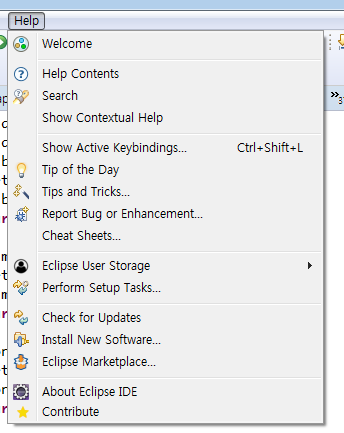



confirm 눌러준후 밑에 사진처럼 동의를 해준다.
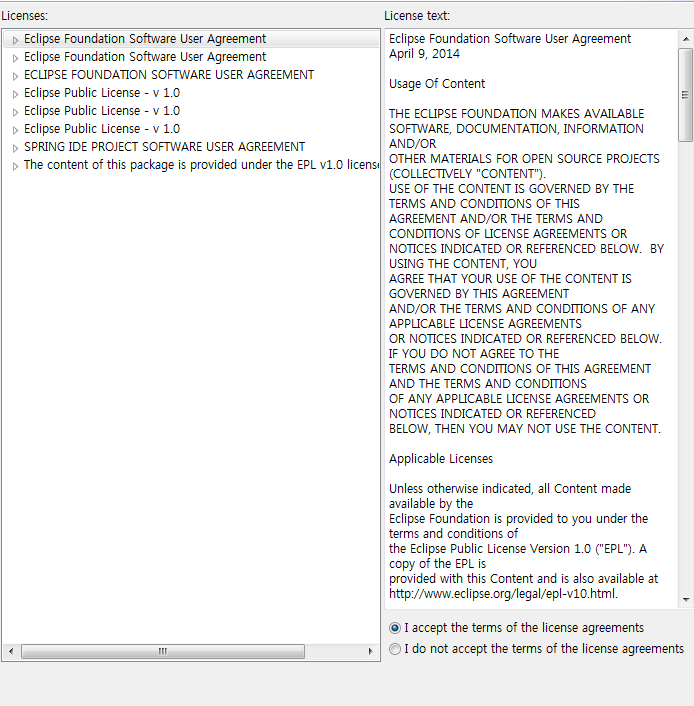
동의후 finish 눌러주면 설치는 끝이다.


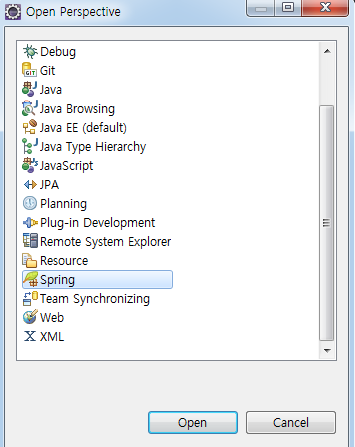
open perspective를 눌러준다
스프링 환경설정에서 perspective 는 view들을 모아둔 레이아수이라고 보면된다. 이런 레이아웃의 종류와 특성이 다르기 때무에 그에 맞게 view을 구성하고 저장해서 필요할때마다 바꿔가며 작업하게 해준다. Spring을 사용할 때 필요한 뷰들이 우선 보여지도록 하기 위한인데 사용 안해도 크게 상관은 없다.
파일탭에서 뉴 눌러주고 Spring Legacy project
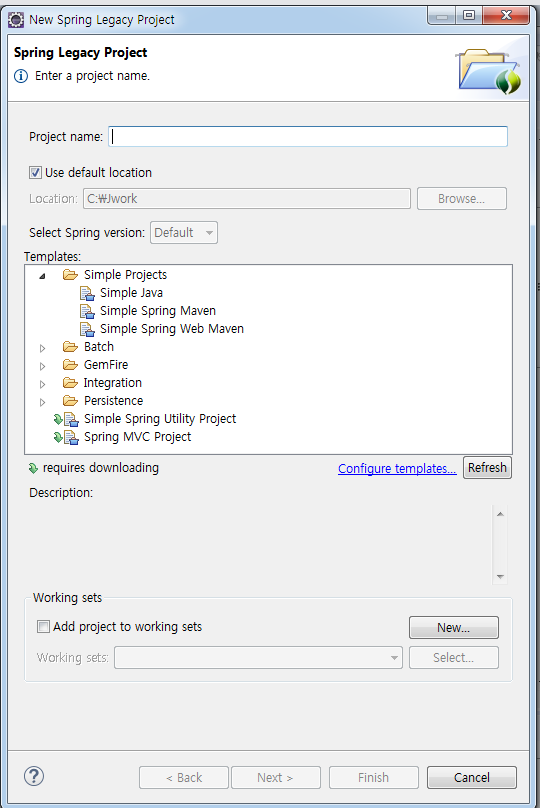
Spring MVC Project 선택하고 next 눌러준다.
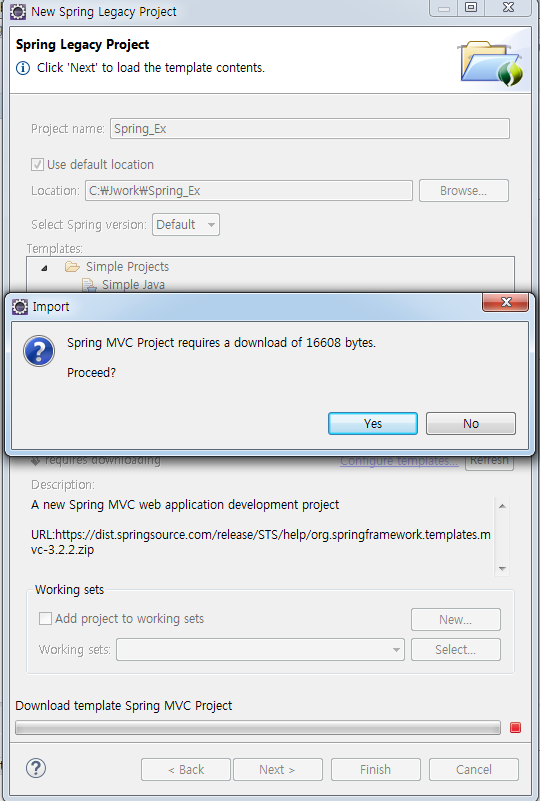
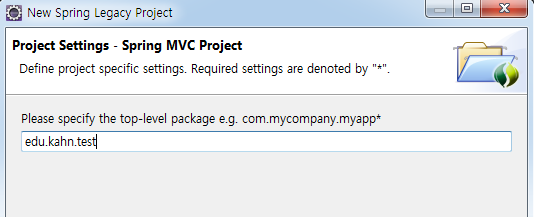
사용자 폴더에서 win7을 들어가서 숨김파일 보이기를 하면 스프링이 설치된 m2폴더가 보인다.

만든 프로젝트 우클릭후 Run As 에서 Run on Server 클릭

이걸 실행하고 오류가 났을시
환경설정
만일 Apache Tomcat 서버가 비활성화 되거나 오류가 보일 수 있는데 이전에 실행했던 프로젝트들이 하나도 안보이는 것을 보면 기존의 Servlet이나 JSP 환경과 다른 새로운 Spring만의 프레임워크라는 것을 알 수 있다.
스프링 프로젝트_명 우클릭> 중간의 Build Path> Configure Build Path..> 새로운 창이 뜨면 Libraries 탭 아래 우측의 Add Library 클릭 > 좌측에서 Server Runtime에 체크하고> NEXT> Server Library 창이 뜨면 Apache Tomcatv8.5를 선택하고 Finish를 클릭> 다시 이전 창에서 Server Runtime[ Apache Tomcat v8.5]가 보이는 지 확인하고 Finish를 클릭한다.> 다시 설정창에서 하단의 Apply and Close를 클릭한다.
이걸 실행하고 오류가 났을시
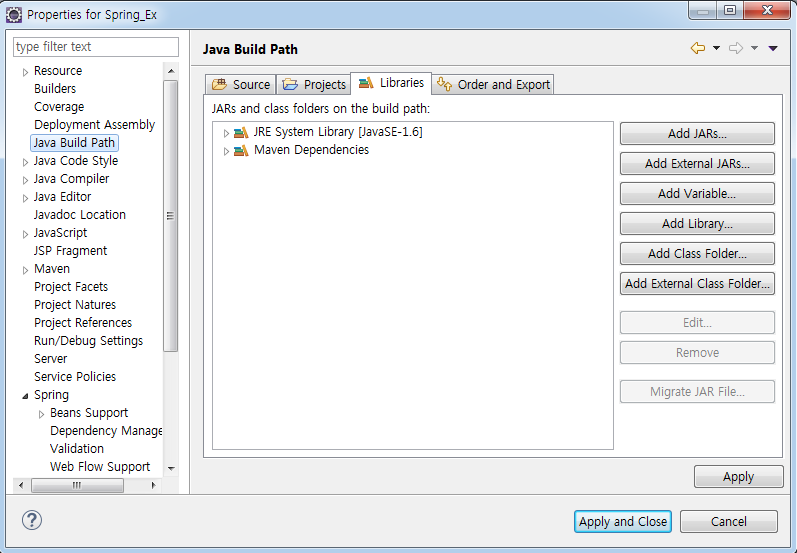
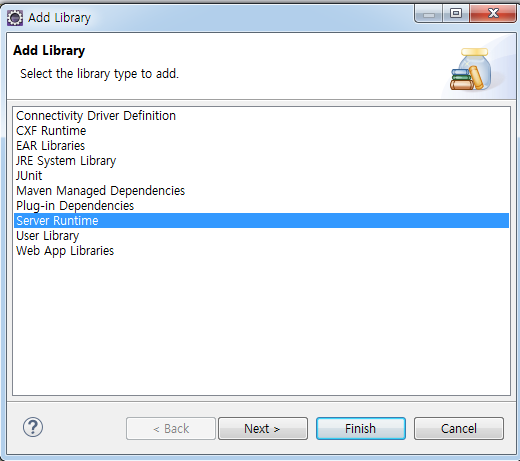
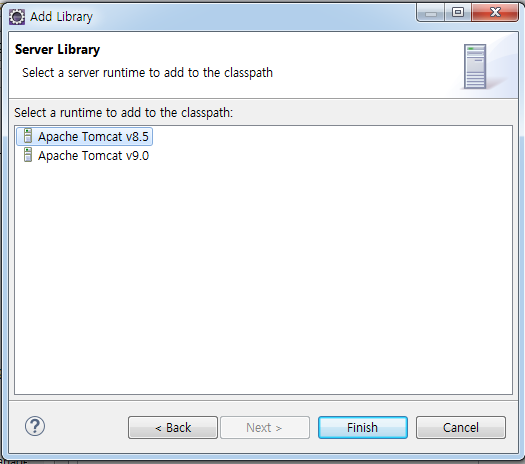
이러고 Apply and close 해준다.
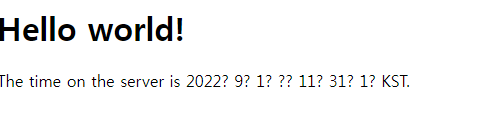
다시 실행했을때 이 화면이 나오면 정상적으로 연결 한것이다.

home.jsp를 열어본다.
<%@ page contentType="text/html; charset=UTF-8" pageEncoding="UTF-8" language="java" %>

<%@ taglib uri="http://java.sun.com/jsp/jstl/core" prefix="c" %>
<%@ page session="false" %>
<html>
<head>
	<title>Home</title>
</head>
<body>
<h1>
	Hello world!
</h1>

<P>  The time on the server is ${serverTime}. </P>
</body>
</html>
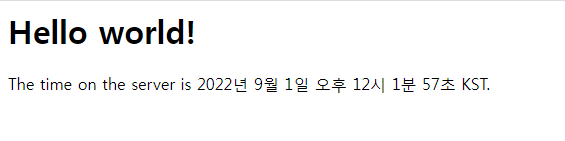
맨위에 <%@ page contentType="text/html; charset=UTF-8" pageEncoding="UTF-8" language="java" %>
추가 하면 한글이 깨지지 않는다.
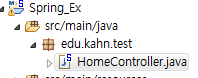
package edu.kahn.test;

import java.text.DateFormat;
import java.util.Date;
import java.util.Locale;

import org.slf4j.Logger;
import org.slf4j.LoggerFactory;
import org.springframework.stereotype.Controller;
import org.springframework.ui.Model;
import org.springframework.web.bind.annotation.RequestMapping;
import org.springframework.web.bind.annotation.RequestMethod;

@Controller
public class HomeController {

	private static final Logger logger = LoggerFactory.getLogger(HomeController.class);

	@RequestMapping(value = "/", method = RequestMethod.GET)
	public String home(Locale locale, Model model) {
		logger.info("Welcome home! The client locale is {}.", locale);

		Date date = new Date();
		DateFormat dateFormat = DateFormat.getDateTimeInstance(DateFormat.LONG, DateFormat.LONG, locale);
		String formattedDate = dateFormat.format(date);
		model.addAttribute("serverTime", formattedDate );
		model.addAttribute("hello", "Spring에 오신 것을 환영합니다");
		// addAtribute로 저장한값을 home.jsp에 포워딩한다.
		return "home";
	}

}
home.jsp에 추가 <P> 4{requestScope.hello}</P> 추가
<%@ page contentType="text/html; charset=UTF-8" pageEncoding="UTF-8" language="java" %>
<%@ taglib uri="http://java.sun.com/jsp/jstl/core" prefix="c" %>
<%@ page session="false" %>
<html>
<head>
	<title>Home</title>
</head>
<body>
<h1>
	Hello world!
</h1>

<P>  The time on the server is ${serverTime}. </P>
<P> ${reauestScope.hello } </P>
</body>
</html>
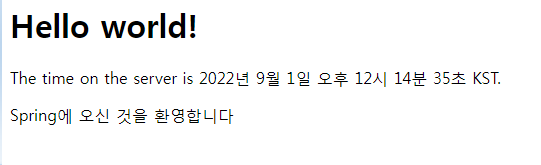
이화면에 Spring에 오신것을 환영합니다라는 문구가 출력된다.
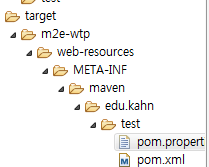
pom.properties 클릭해서 확인해준다.

source.main.java에서 우클릭 클래스를 만들어준다.
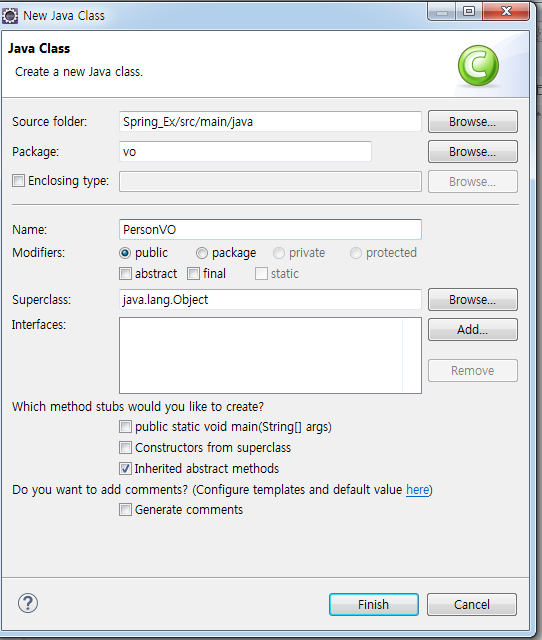
package vo;

public class PersonVO {
	private String name; // Member variables
	private int age;
	private String tel;
	public PersonVO() { // 생성자
		// basic constructor
	}
	public PersonVO(String name, int age, String tel) { // 메써드
		super();
		this.name =name;
		this.age =age;
		this.tel =tel;
	}
	public String getName() {
		return name;
	}
	public void setName(String name) {
		this.name = name;
	}
	public int getAge() {
		return age;
	}
	public void setAge(int age) {
		this.age = age;
	}
	public String getTel() {
		return tel;
	}
	public void setTel(String tel) {
		this.tel = tel;
	}

}// Class Field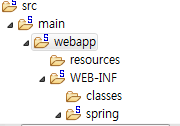
그리고 src 폴더안에 main에 webapp 폴더 우클릭해서 non_spring.jsp 파일 생성
<%@page import="org.springframework.web.context.request.RequestScope"%>
<%@page import="vo.PersonVO"%>
<%@ page language="java" contentType="text/html; charset=UTF-8"
    pageEncoding="UTF-8"%>
<!DOCTYPE html>
<%
	// 기존방식
	//1. 기본생성자 + setter
	PersonVO p1 = new PersonVO();
	p1.setName("홍길동");
	p1.setAge(30);
	p1.setTel("010-111-2222");
	//2. 오버로드된 생성자 사용
	PersonVO p2 = new PersonVO("김길동", 20, "011-333-3333");
	// body에서 EL로 표현하기 위해 page 영역에 저장
	pageContext.setAttribute("p1", p1);
	request.setAttribute("p2", p2);
%>
<html>
<head>
<meta charset="UTF-8">
<title>Insert title here</title>
</head>
<body>
	<p>${p1.name} / ${p1['age'] } / ${p1.tel} </p>
	<p>${p2.name} / ${p2.age} / ${p2.tel}</p>
</body>
</html>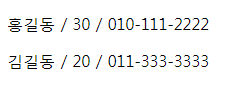
프로세스의 처리 과정 보기
Spring의 기본적인 실행 순서는 다음과 같다.
src 아래의 views 아래에서 web.xml파일을 열고 소스를 보는데
root-context.xml 에 내용 추가
<?xml version="1.0" encoding="UTF-8"?>
<beans xmlns="http://www.springframework.org/schema/beans"
	xmlns:xsi="http://www.w3.org/2001/XMLSchema-instance"
	xsi:schemaLocation="http://www.springframework.org/schema/beans https://www.springframework.org/schema/beans/spring-beans.xsd">

	<!-- Root Context: defines shared resources visible to all other web components -->
	<!-- PersonVO p1 = new PersonVO() -->
	<bean id="p1" class="vo.PersonVO"></bean>

</beans>
PersonVO 수정
package vo;

public class PersonVO {
	private String name; // Member variables
	private int age;
	private String tel;
	public PersonVO() { // 생성자
		System.out.println("--PersonVO의 생성자--");
	}
	public PersonVO(String name, int age, String tel) { // 메써드
		super();
		this.name =name;
		this.age =age;
		this.tel =tel;
	}
	public String getName() {
		return name;
	}
	public void setName(String name) {
		this.name = name;
	}
	public int getAge() {
		return age;
	}
	public void setAge(int age) {
		this.age = age;
	}
	public String getTel() {
		return tel;
	}
	public void setTel(String tel) {
		this.tel = tel;
	}

}// Class Field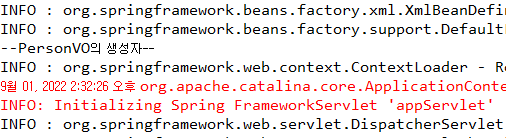
root-context.xml 에 내용 추가
<?xml version="1.0" encoding="UTF-8"?>
<beans xmlns="http://www.springframework.org/schema/beans"
	xmlns:xsi="http://www.w3.org/2001/XMLSchema-instance"
	xsi:schemaLocation="http://www.springframework.org/schema/beans https://www.springframework.org/schema/beans/spring-beans.xsd">

	<!-- Root Context: defines shared resources visible to all other web components -->
	<!-- PersonVO p1 = new PersonVO() -->
	<bean id="p1" class="vo.PersonVO">
	<property name="name" value="홍길동"/>
	<property name="age" value="29"/>
	<property name="tel" value="010-1111-2222"/>
	<!-- setter Injection -->
</bean>
</beans>
PersonVO 수정
package vo;

public class PersonVO {
	private String name; // Member variables
	private int age;
	private String tel;
	public PersonVO() { // 생성자
		System.out.println("--PersonVO의 생성자--");
	}
	public PersonVO(String name, int age, String tel) { // 메써드
		super();
		this.name =name;
		this.age =age;
		this.tel =tel;
	}
	public String getName() {
		return name;
	}
	public void setName(String name) {
		System.out.println("--setName()--호출됨");
		this.name = name;
	}
	public int getAge() {
		return age;
	}
	public void setAge(int age) {
		this.age = age;
	}
	public String getTel() {
		return tel;
	}
	public void setTel(String tel) {
		this.tel = tel;
	}

}// Class Field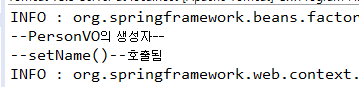
생성자 injection
root-context.xml 에 내용 추가
<?xml version="1.0" encoding="UTF-8"?>
<beans xmlns="http://www.springframework.org/schema/beans"
	xmlns:xsi="http://www.w3.org/2001/XMLSchema-instance"
	xsi:schemaLocation="http://www.springframework.org/schema/beans https://www.springframework.org/schema/beans/spring-beans.xsd">

	<!-- Root Context: defines shared resources visible to all other web components -->
	<!-- PersonVO p1 = new PersonVO() -->

		<!-- setter Injection -->
	<bean id="p1" class="vo.PersonVO">
	<property name="name" value="홍길동"/>
	<property name="age" value="29"/>
	<property name="tel" value="010-1111-2222"/>
	<!-- setter Injection -->
</bean>
<!-- Constructor Injection, 파라미터의 순서를 맞춤!! -->
<bean id="p2" class="vo.PersonVO">
<constructor-arg value="박길동"/>
	<constructor-arg value="33"/>
	<constructor-arg value="011-111-1111"/>
	</bean>

</beans>
PersonVO 수정
package vo;

public class PersonVO {
	private String name; // Member variables
	private int age;
	private String tel;
	public PersonVO() { // 생성자
		System.out.println("--PersonVO의 생성자--");
	}
	public PersonVO(String name, int age, String tel) { // 메써드
		super();
		System.out.println("--name, age, tel을 받는  PersonVO의 생성자");
		this.name =name;
		this.age =age;
		this.tel =tel;

	}
	public String getName() {
		return name;
	}
	public void setName(String name) {
		System.out.println("--setName()--호출됨");
		this.name = name;
	}
	public int getAge() {
		return age;
	}
	public void setAge(int age) {
		this.age = age;
	}
	public String getTel() {
		return tel;
	}
	public void setTel(String tel) {
		this.tel = tel;
	}

}// Class Field
'SPRING' 카테고리의 다른 글
| [SPRING] 09/13 글쓰기 기능, 수정 추가 (0) | 2022.09.13 |
|---|---|
| [SPRING] 09/08 (0) | 2022.09.08 |
| [SPRING] 09/07 (0) | 2022.09.07 |
| [SPRING]09/06 (0) | 2022.09.06 |
| [Spring]09/02 (1) | 2022.09.02 |


댓글