
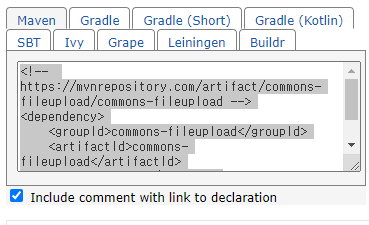
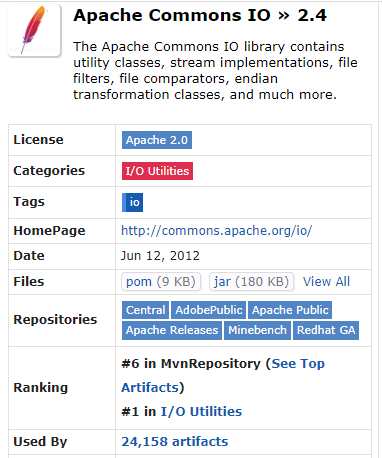
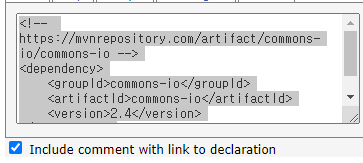
이 코드들을 pom.xml에 추가
그리고 데이터 베이스에
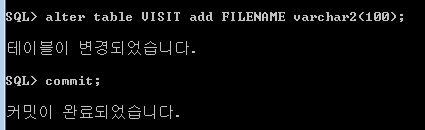
컬럼 추가 해준다.
그리고
context-4-fileupload.xml 생성후
<?xml version="1.0" encoding="UTF-8"?>
<beans xmlns="http://www.springframework.org/schema/beans"
	xmlns:xsi="http://www.w3.org/2001/XMLSchema-instance"
	xmlns:context="http://www.springframework.org/schema/context"
	xsi:schemaLocation="http://www.springframework.org/schema/beans https://www.springframework.org/schema/beans/spring-beans.xsd
		http://www.springframework.org/schema/context http://www.springframework.org/schema/context/spring-context-3.1.xsd">
	<bean name="multipartResolver"
	      class="org.springframework.web.multipart.commons.CommonsMultipartResolver">

		<property name="defaultEncoding" value="utf-8"/>

		<!-- 최대업로드 용량 10mb -->
		<property name="maxUploadSize" value="10485760"/>
	</bean>


</beans>
추가 해준다.
VisitVO 클래스 수정
package vo;

import org.springframework.web.multipart.MultipartFile;

public class VisitVO {
	private int idx;
	private String name, content, pwd, regidate, filename;
	private MultipartFile photoFile;// 파일을 업로드 하는 클래스
	public String getFilename() {
		return filename;
	}
	public void setFilename(String filename) {
		this.filename = filename;
	}
	public MultipartFile getPhotoFile() {
		return photoFile;
	}
	public void setPhotoFile(MultipartFile photoFile) {
		this.photoFile = photoFile;
	}
	public int getIdx() {
		return idx;
	}
	public void setIdx(int idx) {
		this.idx = idx;
	}
	public String getName() {
		return name;
	}
	public void setName(String name) {
		this.name = name;
	}
	public String getContent() {
		return content;
	}
	public void setContent(String content) {
		this.content = content;
	}
	public String getPwd() {
		return pwd;
	}
	public void setPwd(String pwd) {
		this.pwd = pwd;
	}
	public String getRegidate() {
		return regidate;
	}
	public void setRegidate(String regdate) {
		this.regidate = regidate;
	}
}
visit_insert_form.jsp 수정
<%@ page language="java" contentType="text/html; charset=UTF-8"
    pageEncoding="UTF-8"%>
<!DOCTYPE html>
<html>
<head>
<meta charset="UTF-8">
<title>Insert title here</title>

<script>
	function send(f){

		let name = f.name.value;
		let content = f.content.value;
		let pwd = f.pwd.value;

		// 유효성체크 했다치고

		f.action = "insert.do";
		f.method = "post";
		f.submit();//전송
	}
</script>
</head>
<body>
<!-- 파일을 전송하는 폼태그에는 아래의 두가지 속성이 반드시 추가되어 있어야 한다!!!
method="POST" enctype="multipart/form-data"
  -->
<form method="POST" enctype="multipart/form-data">
	<table border="1" align="center">
	<caption>:::새글쓰기:::</caption>

	<tr>
	<th>작성자</th>
	<td><input name="name"></td>
	</tr>
	<tr>
	<th>내용</th>
	<!-- wrap='on' : textarea에서 작성된 글이 길어서 다음줄로 넘어갔을때
	엔터값으로 인지할 수 있도록 해주는 속성 -->
	<td><textarea name="content" rows="5" cols="50" wrap="on">

	</textarea></td>
	</tr>
	<tr>
	<th>비밀번호</th>
	<td><input type="password" name="pwd"></td>
	</tr>

	<tr>
	<th>사진첨부</th>
	<td><input type="file" name="photo"></td>
	</tr>
	<tr>
	<td colspan="2" align="center">
		<input type="button" value="글쓰기" onclick="send(this.form);">
		<input type="button" value="목록으로" onclick="location.href='list.do'">

	</td>
	</tr>
	</table>
</form>

</body>
</html>
VisitController.java 클래스 수정
package com.korea.vs;

import java.io.File;
import java.io.IOException;
import java.util.List;

import javax.servlet.ServletContext;
import javax.servlet.http.HttpServletRequest;

import org.springframework.beans.factory.annotation.Autowired;
import org.springframework.stereotype.Controller;
import org.springframework.ui.Model;
import org.springframework.web.bind.annotation.RequestMapping;
import org.springframework.web.bind.annotation.ResponseBody;
import org.springframework.web.multipart.MultipartFile;

import dao.VisitDAO;
import vo.VisitVO;

@Controller
public class VisitController {

	//Autowired를 통해서 new를 통한 객체생성 없이 서블릿에서 제공해주는 클래스는
	//자동으로 메모리할당 받을 수 있다.
	@Autowired
	ServletContext application;
	//서블릿 안에서 제공해주는 클래스

	@Autowired
	HttpServletRequest request;

	VisitDAO visit_dao;
	public void setVisit_dao(VisitDAO visit_dao) {
		this.visit_dao = visit_dao;
	}

	@RequestMapping(value = {"/", "/list.do"})
	public String list(Model model) {
		//방명록 조회를 위한 dao의 메서드 호출
		List<VisitVO> list =visit_dao.selectList();
		model.addAttribute("list",list);

		//sendRedirect(/aaa.do);
		//return "redirect:list.do"
		return "/WEB-INF/views/visit/visit_list.jsp";
	}

	//삭제 메써드
	@RequestMapping("/delete.do")
	@ResponseBody //return값을 jsp등으로 인식하지 않고, 콜백 메서드로 전달하기 위한 키워드
	public String delete(int idx, String filename) {

		//삭제하기 위한 절대경로
		String webPath ="/resources/upload/";
		String savePath =application.getRealPath(webPath);


		int res = visit_dao.delete(idx);

		String result = "no";
		if (res==1) {
			result="yes";
			File f = new File(savePath,  filename);

			if (f.exists()) {
				f.delete();//file클래스 경로의 파일을 제거
			}
		}
		//@REsponseBody가 적용되어 있으므로
		//result에 no 또는 yes데이터는 콜백 메서드로 돌아간다
		return result;
	}
	@RequestMapping("/insert_form.do")
	public String insert_form() {
		return "/WEB-INF/views/visit/visit_insert_form.jsp";
	}

	// 새글등록하기
	@RequestMapping("/insert.do")
	public String insert(VisitVO vo) {

		//사진을 업로드할 절대경로를 지정
		String webPath ="/resources/upload/";
		String savePath =application.getRealPath(webPath);
		System.out.println("절대경로: "+savePath);

		//업로드할 파일의 정보
		MultipartFile photo=vo.getPhoto();

		String filename = "no_file";

		//업로드 된 파일이 존재한다면
		if(!photo.isEmpty()) {
			//업로드될 파일의 파일명
			filename = photo.getOriginalFilename();

			//파일을 저장할 경로
			File saveFile = new File(savePath, filename);

			if (!saveFile.exists()) {
				saveFile.mkdirs();

			}else {
				long time = System.currentTimeMillis();
				filename = String.format("%d_%s", time, filename);
				saveFile = new File(savePath, filename);
			}

			//업로드된 파일은 임시저장소에서 일정시간이 지나면 사라지는데,
			//현재 내가 지정한 upload폴더까지 경로로 사라지지 않도록 파일을 복사하는 메서드
			try {
				photo.transferTo(saveFile);
			} catch (IllegalStateException e) {
				// TODO Auto-generated catch block
				e.printStackTrace();
			} catch (IOException e) {
				// TODO Auto-generated catch block
				e.printStackTrace();
			}

		}

		//vo에 파일명을 저장해서 DB로 전달
		vo.setFilename(filename);


		int res = visit_dao.insert(vo);

		//sendRedirect("list.do");
		return "redirect:list.do"; //list.do매핑을 호출하는 방법

	}
	//글수정 폼으로 이동
	@RequestMapping("/modify_form.do")
	public String modify_form(Model model, int idx) {

		VisitVO vo = visit_dao.selectOne(idx);

		if (vo != null) {
			model.addAttribute("vo", vo);

		}
		return "/WEB-INF/views/visit/visit_modify_form.jsp";
	}

	//게시글 수정
	@RequestMapping("/modify.do")
	public String modify(VisitVO vo) {
		int res=visit_dao.update(vo);

		return "redirect:list.do";

	}
}
servlet-context.xml
Autowired를 쓰기 위한 걸 추가해준다.
<?xml version="1.0" encoding="UTF-8"?>
<beans:beans xmlns="http://www.springframework.org/schema/mvc"
	xmlns:xsi="http://www.w3.org/2001/XMLSchema-instance"
	xmlns:beans="http://www.springframework.org/schema/beans"
	xmlns:context="http://www.springframework.org/schema/context"
	xsi:schemaLocation="http://www.springframework.org/schema/mvc https://www.springframework.org/schema/mvc/spring-mvc.xsd
		http://www.springframework.org/schema/beans https://www.springframework.org/schema/beans/spring-beans.xsd
		http://www.springframework.org/schema/context https://www.springframework.org/schema/context/spring-context.xsd">

	<!-- DispatcherServlet Context: defines this servlet's request-processing infrastructure -->

	<!-- Enables the Spring MVC @Controller programming model -->
	<annotation-driven />

	<!-- Handles HTTP GET requests for /resources/** by efficiently serving up static resources in the ${webappRoot}/resources directory -->
	<resources mapping="/resources/**" location="/resources/" />

	<!-- Resolves views selected for rendering by @Controllers to .jsp resources in the /WEB-INF/views directory -->
	<!-- <beans:bean class="org.springframework.web.servlet.view.InternalResourceViewResolver">
		<beans:property name="prefix" value="/WEB-INF/views/" />
		<beans:property name="suffix" value=".jsp" />
	</beans:bean> -->

	<!--
	com.korea.db패키지의 컨트롤러를 자동으로 만들어주는 코드
	<context:component-scan base-package="com.korea.db" /> -->

	<!-- Autowired기능을 사용하기 위한 속성추가 -->
	<context:annotation-config/>

	<!-- 컨트롤러 수동생성 컴트롤러엔 id가 없어도 됨!-->
	<beans:bean id="con" class="com.korea.vs.VisitController">
		<beans:property name="visit_dao" ref="visit_daoBean"/>
	</beans:bean>

</beans:beans>
visit_list.jsp 수정
<%@ page language="java" contentType="text/html; charset=UTF-8"
	pageEncoding="UTF-8"%>
<%@taglib prefix="c" uri="http://java.sun.com/jsp/jstl/core"%>
<!DOCTYPE html>
<html>
<head>
<meta charset="UTF-8">
<title>Insert title here</title>
<style type="text/css">
* {
	magin: 0;
	padding: 0
}

#main_box {
	width: 330px;
	margin: 0 auto;
}

h1 {
	text-align: center;
	font-size: 20px;
	margin: 10px 0 10px 0;
	color: #ffffff;
	text-shadow: 2px 2px 2px black;
}

.visit_box {
	margin: 0 auto;
	width: 330px;
	margin-top: 30px;
	box-shadow: 2px 2px 2px black;
	border: 1px solid gray;
}

.type_content {
	min-height: 100px;
	height: auto;
	background: #fcc;
}

.type_name {
	background: #cfc;
}

.type_regdate {
	background: #ccf;
}
</style>
<!-- Ajax사용을 위한 httprequest참조 -->
<script src="/vs/resources/js/httpRequest.js"></script>
<script>
	/* 삭제 버튼 클릭*/
	function del(f) {
		var pwd = f.pwd.value; //원본 비밀번호
		var c_pwd = f.c_pwd.value;//비교를 위한 번호

		if (pwd != c_pwd) {
			alert('비밀번호가 다릅니다');
			return;
		}
		//Ajax를 통해 idx를 서버로 전송
		var url = "delete.do";
		var param = "idx=" + f.idx.value +"&filename=" +f.filename.value;
		sendRequest(url, param, resultFunc, "Post");

	}//del()

	/*삭제 결과를 확인랑 콜백 메서드*/
	function resultFunc() {
		if (xhr.readyState == 4 && xhr.status == 200) {
			//컨트롤러에서 삭제후 return해준 데이터를 받는다
			var data = xhr.responseText;

			if (data == 'no') {
				alert("삭제실패");
				return;
			} else {
				alert("삭제성공");
				location.href = "list.do";
			}
		}
	}

	/* 수정 버튼 클릭*/
	function modify(f) {
		var pwd = f.pwd.value; //원본 비밀번호
		var c_pwd = f.c_pwd.value;//비교를 위한 번호

		if (pwd != c_pwd) {
			alert('비밀번호가 다릅니다');
			return;
		}
		f.action = "modify_form.do";
		f.method = "post";
		f.submit();

	}
</script>
</head>
<body>
	<div id="main_box">
		<h1>:::방명록 리스트:::</h1>
		<div align="center">
			<input type="button" value="글쓰기"
				onclick="location.href='insert_form.do'">
		</div>

		<c:forEach var="vo" items="${list}">
			<div class="visit_box">
				<div class="type_content">
					<pre>${vo.content}</pre>
					<br>
					<c:if test="${vo.filename ne 'no_file' }">
						<img src="/vs/resources/upload/${vo.filename}" width="200" />
					</c:if>
				</div>
				<div class="type_name">${vo.name}</div>
				<div class="type_regdate">작성일:${vo.regdate}</div>

				<div>
					<form>
						<input type="hidden" name="filename" value="${vo.filename}">
						<input type="hidden" name="idx" value="${vo.idx}"> <input
							type="hidden" name="pwd" value="${vo.pwd}"> 비밀번호 <input
							type="password" name="c_pwd"> <input type="button"
							value="수정" onclick="modify(this.form);"> <input
							type="button" value="삭제" onclick="del(this.form);">

					</form>
				</div>
			</div>
		</c:forEach>
	</div>
</body>
</html>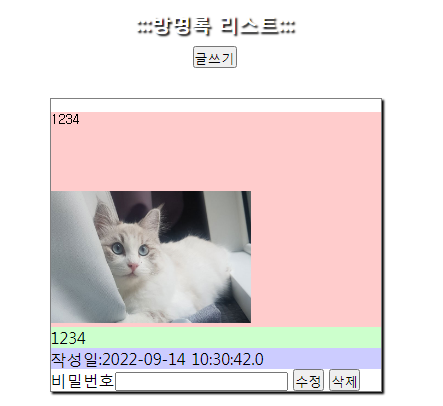
'SPRING' 카테고리의 다른 글
| [SPRING] 09/16 게시판만들기-2 (0) | 2022.09.16 |
|---|---|
| [SPRING] 0915 게시판 만들기-1 (0) | 2022.09.15 |
| [SPRING] 09/13 글쓰기 기능, 수정 추가 (0) | 2022.09.13 |
| [SPRING] 09/08 (0) | 2022.09.08 |
| [SPRING] 09/07 (0) | 2022.09.07 |


댓글