IO(Input/Output)
IO는 입출력 스트림을 의미한다. 스트림(Stream)이란 데이터를 입출력하기 위한 방법으로 프로그램에서 파일을 읽어온다든지, 콘솔에서 키보드 값을 업어오는 등의 작업을 말한다. 자바 가상머신 JVM에서 콘솔로 값을 보낼 땐 Output, 반대로 콘솔의 값을 JVM에서 읽을 땐 Input을 사용한다.
package java13;
import java.io.File;
public class Test15 {

	public static void main(String[] args) {
		String path = "D:/Jwork/test_io.txt";
		File f1 = new File(path);
		if(f1.isFile()) {
			System.out.println("파일의 크기 : "+f1.length()+ "byte");
		}
	}

}
package java0808;

import java.io.File;

public class Test01 {

	public static void main(String[] args) {
		// TODO Auto-generated method stub
		String path="C:/Jwork";   //  폴더 지정
		File f1 = new File(path);
		if (!f1.isFile()) {   // f1이 폴더, f1.isDirectory()
			String[] names = f1.list();
			System.out.println("이 폴더에 있는 목록들 : ");
			for (int i = 0; i < names.length; i++) {
				System.out.println(names[i]);

			}
//			if (f1.isDirectory()) {
//				File[] arr = f1.listFiles();
//				for (int i = 0; i < arr.length; i++) {
//					if(arr[i].isDirectory()) {
//						System.out.println(arr[i].getName());
//					}
//				}

			}

		}
	}
package java0808;

import java.io.File;

public class Test02 {

	public static void main(String[] args) {
		// TODO Auto-generated method stub
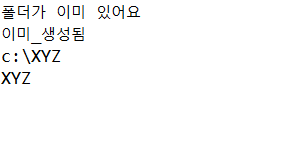
		String path ="c:/XYZ";
		File f1 = new File(path);
		if (!f1.exists()) {
			System.out.println("새로운 폴더를 생성합니다");
			f1.mkdirs();  // mkdirs() 메써드로 폴더 생성
			System.out.println(f1.isDirectory() ? "생성_성공":"생성_실패");

		}else {
			System.out.println("폴더가 이미 있어요");
			System.out.println(f1.isDirectory() ? "이미_생성됨" : "추가_생성_실패");
			if (f1.exists()) {
				System.out.println(f1.getPath()); //경로를 보여줌
			}

		}
		System.out.println(f1.getName());
	}

}
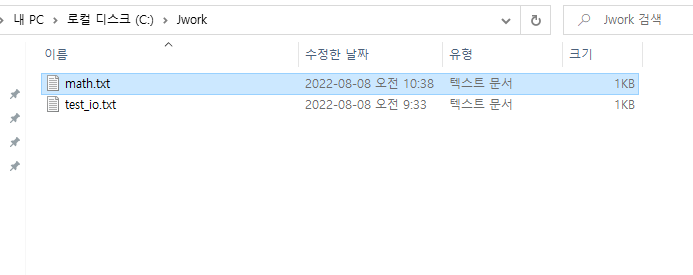
파일 생성과 쓰기
package java0808;
import java.io.*;
public class Test04 {

	public static void main(String[] args) {
		// TODO Auto-generated method stub
		try {
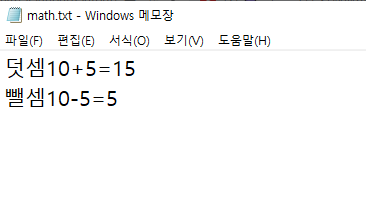
			FileWriter out = new FileWriter("C:/Jwork/math.txt");
			String lf = System.getProperty("line.separator");
			int a=10, b=5;
			out.write("덧셈");
			out.write(a + "+" + b + "=" + (a + b) + lf);
			out.write("뺄셈");
			out.write(a + "-" + b + "=" + (a - b) + lf);
			out.close();
		} catch (Exception e) {
			System.out.println(e);
		}
	}

}
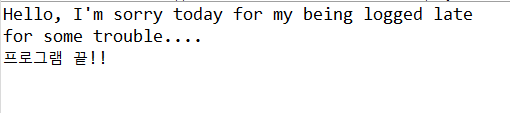
파일 읽기
package java0808;

import java.io.File;
import java.io.FileInputStream;
import java.io.FileNotFoundException;
import java.io.IOException;

public class Test05 {

	public static void main(String[] args)
	 throws FileNotFoundException, IOException{
		String path = "C:/Jwork/test_io.txt";
		File f1 = new File(path);
		if (f1.exists()) {
			FileInputStream fis = new FileInputStream(f1); // 읽기, 더이상 읽을 것이 없으면 -1 반환
			int code = 0;
			while ((code = fis.read()) != -1) {  // 파일에 내용이 있다면
				System.out.print((char)code);
				// 그냥 code를 출력하면 한글은 UNICODE이어서 깨지므로 int 자료형에 담아서 char로 형변화해서 출력하면 ASCII코드로 출력된다.
			}
			if (fis != null) {
				fis.close();
			}
		}
		System.out.println("프로그램 끝!!");
	}

}
package java0808;

import java.io.File;
import java.io.FileInputStream;
import java.io.FileNotFoundException;
import java.io.IOException;

public class Test05 {

	public static void main(String[] args)
	 throws FileNotFoundException, IOException{
		String path = "C:/Jwork/test_io.txt";
		File f1 = new File(path);
		byte b_Read[] = new byte[100];  // 이 부분이 적으면 파일을 읽다가 자른다.
		if (f1.exists()) {
			FileInputStream fis = new FileInputStream(f1); // 읽기, 더이상 읽을 것이 없으면 -1 반환
			fis.read(b_Read, 0, b_Read.length);   // read() 메써드에 시작_위치, 끝_위치 지정
			System.out.println(new String(b_Read).trim());  // 모든 내용을 다 보여라
			if (fis != null) {
				fis.close();
			}
		}
		System.out.println("프로그램 끝!!");
	}

}
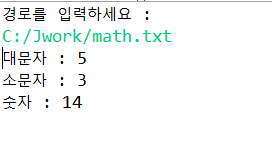
Q1) C:\Jwork에 testt.txt 파일을 생성하고 파일의 내용을 대소문자+ 숫자 등을 입력해서 저장한다.
Scanner 메써드로 testt.txt 파일의 경로를 입력받아서 FileReader를 통해서 이파일에 알파벳 대 소문자, 숫자가 각각 몇 개씩 인지 보이시오.
package java0808;

import java.io.FileReader;
import java.io.FileWriter;
import java.util.Scanner;

public class Q1 {

	public static void main(String[] args) {
		// TODO Auto-generated method stub
		System.out.println("경로를 입력하세요 : ");
		Scanner scan = new Scanner(System.in);
		String str = scan.next().trim();
		FileReader fr = null;
		try {
			fr =new FileReader(str);
			int console =0;
			int upper = 0;
			int lower= 0;
			int num =0;
			while ((console = fr.read()) != -1 ) {
				if (console >='A'&& console<= 'Z') {
					upper++;
				}
				if (console >='a'&&console<='z') {
					lower++;
				}
				if (console >='0'&&console <='9') {
					num++;
				}

			}
			System.out.println("대문자 : "+upper);
			System.out.println("소문자 : "+lower);
			System.out.println("숫자 : "+num);

		} catch (Exception e) {
		}finally {
			try {
				if (fr !=null) {
				fr.close();
				}
			} catch (Exception e2) {
			}

		  }
		}
	}
'JAVA' 카테고리의 다른 글
| [JAVA] IO < 버퍼>, < byte stream>, <Char stream> (0) | 2022.08.08 |
|---|---|
| [JAVA]file class (0) | 2022.08.08 |
| [JAVA] 제네릭(Generic) (0) | 2022.08.03 |
| [JAVA]다형성 (0) | 2022.08.03 |
| [JAVA] Lamda식 (0) | 2022.08.03 |


댓글